Techno Blog

Chronicles of the Digital Era

Chronicles from the Digital Era: Cybersecurity Watch and Expertise

Security

Securing Active Directory Certificate Services (AD CS): Identify and Fix Critical Vulnerabilities

Reading time :

3 minute(s)

-

25 February 2025

Build stronger cyber resilience

Misconfigurations that fly under the radar

Active Directory Certificate Services (AD CS) is a critical component for managing digital identities and certificates in an organization. However, improper configurations can expose your network to serious vulnerabilities.

Often overlooked, these weaknesses can allow attackers to gain elevated privileges and compromise the integrity of your environment. Here, we explore two major vulnerabilities—ESC1 and ESC8—and the corrective measures to secure your infrastructure.

Understanding AD CS and its risks

Active Directory Certificate Services (AD CS) is Microsoft’s public key infrastructure (PKI) component, integrated with Active Directory. It manages digital certificates, authentication, and digital signatures within Windows environments. Most certificates issued by AD CS also enable users to authenticate to your network, similar to entering a username and password.
The main advantages of using AD CS in your environment include:

  • Enhanced security: AD CS ties the identity of a person, computer, or service to a corresponding private key, improving the security of communications and authentications.
  • Efficient certificate management: It offers a cost-effective, secure way to handle certificate issuance, renewal, and revocation.
  • Integration with Active Directory: AD CS leverages existing identity information in Active Directory to enroll certificates, automatically populates certificate details, and uses Group Policy to control which types of certificates are issued to users and devices.

However, despite these benefits, AD CS can introduce vulnerabilities if not configured properly—even with Microsoft’s default settings.
In 2021, researchers at U.S.-based SpecterOps published an in-depth study highlighting multiple potential flaws in AD CS. To make referencing these vulnerable configurations easier, they numbered them with the prefix “ESC” (short for “Escalation,” since exploiting them results in privilege escalation). ESC1 and ESC8 represent two distinct privilege escalation scenarios caused by AD CS misconfigurations, which we’ll explore next.

ESC1: Dangerous permissions on adding a Subject Alternative Name

Detecting the vulnerability:

This vulnerability arises when certificate templates are misconfigured, allowing non-privileged users to add entries to the subjectAltName field when requesting a certificate from a vulnerable certificate template.

The Subject Alternative Name (SAN) attribute is used in digital certificates to include multiple alternative identities alongside the certificate’s main subject. This is legitimate, for example, when a certificate needs to be valid for several domains at once.

The issue occurs when a domain account can include its own alternative subject in the certificate request, and that certificate can also be used to authenticate to the domain. An attacker with access to such an account could generate a certificate allowing them to authenticate as a domain administrator—ultimately compromising the domain.

To check if any of your certificate templates are vulnerable to ESC1, open the Certificate Templates console by running “certtmpl.msc” on your AD CS server. From there, you’ll find all the certificate templates linked to your AD CS.


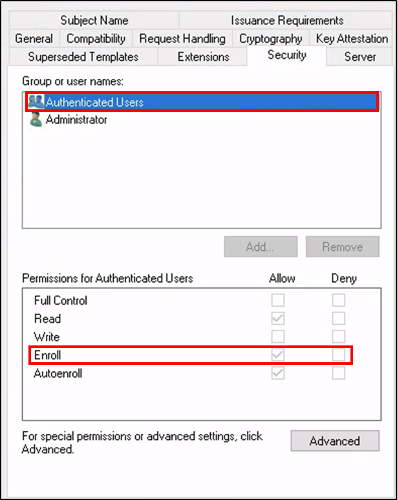
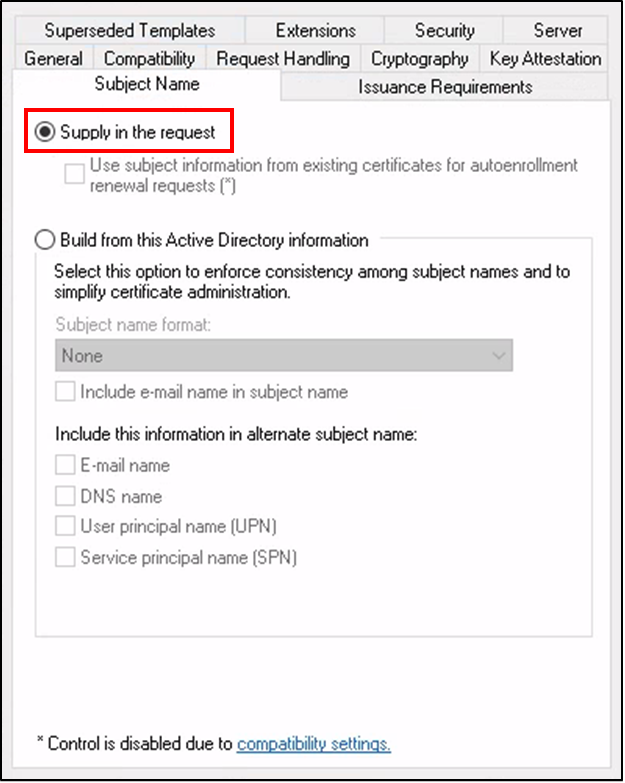
To identify a vulnerable template, it should have all three of the following characteristics, which you can verify by right-clicking the template to view its properties:

  1. The certificate template allows a non-domain admin user to submit requests.
  1. The subject name in the request can be specified by the requester (“Supply in the request”).
  1. The certificate template allows domain authentication. This means the user can use the certificate to authenticate via Kerberos as any user they specified in their request.

Fixing this vulnerability
The remediation always depends on the intended use case for the certificate. Often, the “Supply in the request” attribute was added by accident and can simply be removed. In other cases, too many permissions may have been granted to a user or group, and these can be revoked. Sometimes, the certificate template is no longer needed at all and can be deleted.

ESC8: AD CS HTTP service vulnerability

Detecting the vulnerability:

ESC8 occurs when the HTTP service of Active Directory Certificate Services (AD CS) is vulnerable to NTLM relay attacks. The HTTP service is convenient because it allows users to easily generate certificates from a web portal. However, a major risk to be aware of is that this service is vulnerable to such attacks in its default configuration. System administrators sometimes deploy it with default settings, unaware they’re introducing a critical vulnerability into their network.

Attackers can use various techniques to force a Windows server machine account to authenticate to them—most notably the PetitPotam technique, discovered by researcher Gilles Lionel in 2021. The NTLM connection can then be relayed to the AD CS HTTP service to obtain a certificate for those machines and use it for malicious purposes. This attack is often employed to impersonate a domain controller and compromise the entire domain.

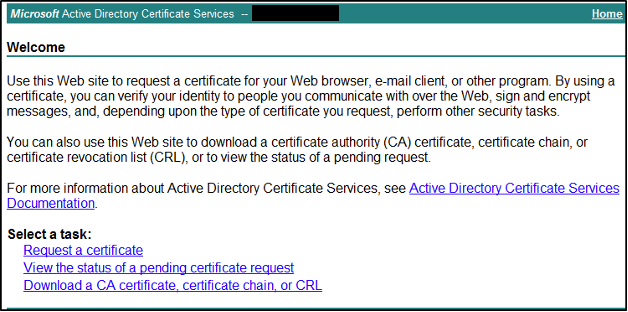
To check if the HTTP service is enabled and potentially vulnerable, go to Server Manager on your AD CS server and look for a service called Certificate Enrollment Web Service. If it’s running, navigate to « http://<your_server_name>/certsrv ».

If a page like this is accessible over HTTP, your AD CS server is definitely vulnerable.

However, simply enabling HTTPS is not enough to secure your server. Even if the service is only accessible via HTTPS, you must also go into the IIS console and ensure the “Require” option is selected for the Certificate Enrollment Web Service, for the Certification Authority Web Enrollment, and update the web.config file created by the CES role.

While these steps may seem complex, you can follow Microsoft’s recommendations in KB5005413, which clearly details each step to properly secure your AD CS HTTP service.

Strengthen your cyber resilience with our experts

The ESC1 and ESC8 vulnerabilities highlight the importance of rigorous AD CS configuration management.

At Precicom, we offer specialized services to secure your Active Directory infrastructure—including your AD CS environment—to reduce the major risks associated with improper configurations. Our experts support you to:

1. Detect vulnerabilities

Our specialists analyze your environment to identify security gaps, including those highlighted in this article, as well as other often-overlooked critical configurations.

2. Recommend concrete actions

We provide a clear, tailored plan to correct risky configurations and strengthen your infrastructure’s security.

3. Secure your environment

We implement proven measures to reduce risks and ensure effective protection of your systems.

4. Raise team awareness

We deliver targeted training to boost vigilance and best practices in certificate and AD CS management.

Securing AD CS means strengthening your organization’s cyber resilience against today’s threats.

Precicom: cybersecurity, governance, managed IT services, and digital innovation
Precicom Technologies - cube noir
Precicom logo

With a full range of solutions, ISO 27001 certification, and trusted teams and partners, we’ve been providing strategic support for the digital management of public and private organizations for over 25 years.

This content might be of interest to you.

Tabletop exercices TTX

Compliance

Prepare your organization for security threats.

Martin Dagnault

Cyber Resilience Team Lead

4 minute(s) »

Cybersecurity Training and Awareness: Empowering Employees as Your First Line of Defence

Security

Cybersecurity Training and Awareness: Empowering Employees as Your First Line of Defence

Precicom

A Trusted Leader in Governance, Cybersecurity, Managed Services, and IT Innovation

10 minute(s) »

Find chronicles related to our solutions

Precicom: cybersecurity, governance, managed IT services, and digital innovation
Precicom Technologies - cube noir

Looking for digital efficiency?

Our solutions are delivered in partnership with the industry’s top providers. The organizations that trust us know they’re working with certified IT specialists who understand their needs. They can count on a strategic technology partner, allowing them to focus on what matters most—their core business.

We combine our business acumen, expertise, and knowledge to optimize, secure, and expand digital environments. We push the limits of technology to exceed expectations.

We are Precicom.

Your unsubscription could not be processed. Please try again.
Your unsubscription has been successfully completed.

Unsubscribe from our mailing list

No longer wish to receive our electronic communications? Please fill in the field below and click on "Unsubscribe," and we will stop sending you our tech and event newsletters.